How do I log into my account?
There are two types of affiliate account holders for NC State University Libraries: Unity Users and Library Patrons.
Unity Users are students, staff, faculty, and other affiliates who are assigned a Unity ID by the university. Unity Users will login using their Unity login and password.
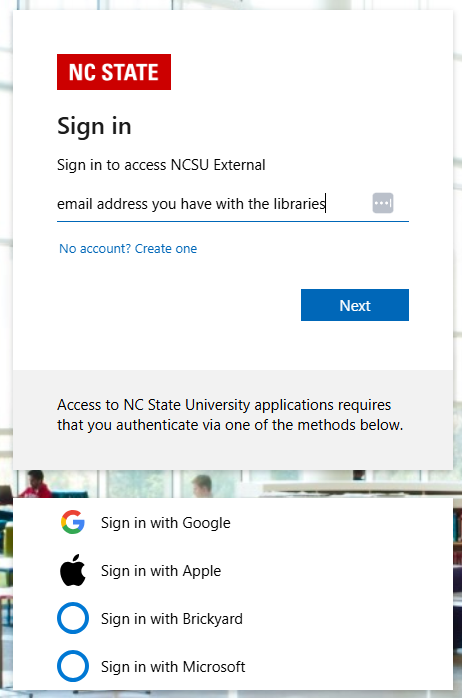
Other Library Patrons are Friends of the Libraries, OLLI Members, and other affiliates who do not have a Unity ID assigned by the university. Library Patrons will login using a third-party provider login, such as Google, Apple, or Microsoft, that they have registered with the Libraries.
Before you reach a login window, you will be brought to a page that asks you to select your affiliation (shown below).
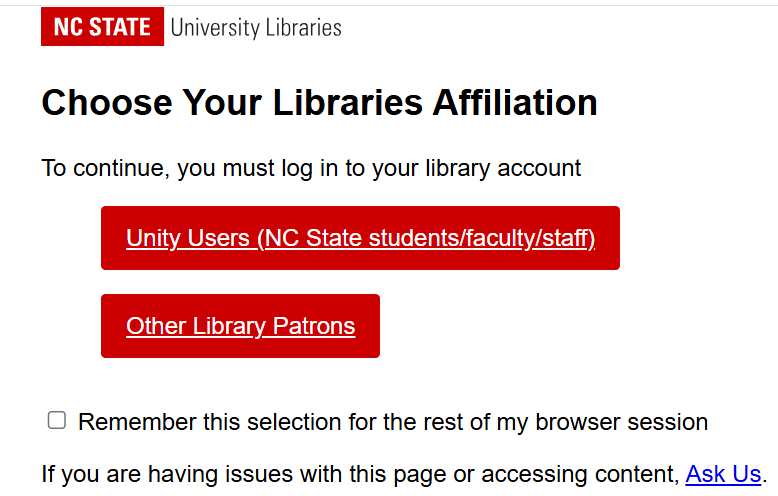
If you select the wrong affiliation and are unable to login, you will need to close your browser window, open a new one, and select the correct affiliation. Many browsers save your original selection and clearing your history or closing the window is the only way to refresh the selection page.
Library Patron users will then see a login screen with options to select your third-party provider (shown below). Select the provider that you registered with the library and follow the instructions to sign in.
If you are having difficulty logging in, follow the steps below:
For Unity Users: If you are a current student, staff, or faculty, contact the Libraries to make sure your account is active. If your library account is active, you will need to contact OIT, who manage Unity access.
For Library Patrons: Contact the Libraries to make sure that your account is active or for help renewing your account.
Was this helpful?
We're glad! Thanks for the feedback.
Website feedback
We hear you! Thanks for letting us know.
Categories
Keywords: access, login, login error, password, log in, can't, shibboleth, entra
Last Edited: Aug 28, 2026
If you need more help, please Ask Us.